If you rely on GoodbyeDPI to get around deep packet inspection (DPI) blocking, you already know it works well on Windows — and how limited it feels on Linux, macOS, or a router. The good news: secure, open-source GoodbyeDPI alternatives now fill many of those gaps, and several cover platforms GoodbyeDPI leaves behind.
This guide compares the most reliable options, explains how they work, and helps you choose — and switch to — the one that fits your setup.
Quick answer: The most widely used GoodbyeDPI alternatives are ByeDPI (cross-platform, actively maintained), Zapret (Linux/router-friendly), PowerTunnel (Java-based GUI proxy), and GreenTunnel (lightweight Node.js proxy). ByeDPI is the closest overall match; Zapret is best for router-level use; PowerTunnel suits users who want a GUI; and GreenTunnel is a minimal local proxy. Each uses the same core idea as GoodbyeDPI — reshaping how packets look in transit — but targets a different platform or use case.
What Is GoodbyeDPI, and Why Look for an Alternative? {#what-is-goodbyedpi}
GoodbyeDPI is an open-source Windows utility that alters outgoing packets — fragmenting TLS handshakes, tweaking TTL values, and similar tricks — so that deep packet inspection systems can’t match traffic against their block lists. It doesn’t decrypt or reroute anything; it just makes blocked traffic harder for DPI to fingerprint.
That narrow, Windows-only design is exactly why people go looking for alternatives:
- No native Linux, macOS, Android, or router support — GoodbyeDPI is a Windows executable, full stop.
- Command-line only — there’s no built-in GUI for less technical users.
- Single-technique approach — some networks have DPI systems that adapt, and a single fragmentation method can stop working.
- No mobile equivalent — many people need DPI bypass on a phone, not just a desktop.
If any of that sounds familiar, the tools below solve one or more of these gaps while keeping the same open-source, auditable spirit.
How to Choose the Right GoodbyeDPI Alternative {#how-to-choose}
Before picking a tool, match it against your actual environment. Ask:
- What’s your OS? Windows, Linux, macOS, Android, or router firmware such as OpenWrt.
- Do you need a GUI, or are you comfortable with a terminal?
- Is the project actively maintained? DPI systems evolve, so a stale repo is a real risk.
- Does it need root/admin access, and are you okay granting that?
- Can you audit the source, or does it have enough community review to trust it?
- Does it integrate with your existing setup (browser only, system-wide, or router-level)?
Prioritizing active maintenance and code transparency matters more than raw feature count — a DPI bypass tool that stops receiving updates loses effectiveness fast as network operators adjust their inspection rules.
Comparison Table: Top GoodbyeDPI Alternatives at a Glance {#comparison-table}
| Tool | Platform(s) | Interface | License | Best For |
| ByeDPI | Windows, Linux, macOS, Android | CLI + GUI wrapper | Open-source (GPL) | Cross-platform users wanting a direct GoodbyeDPI-style approach |
| Zapret | Linux, routers (OpenWrt) | CLI / iptables rules | Open-source (GPL) | Router-level, always-on bypass for a whole home network |
| PowerTunnel | Windows, Linux, macOS | GUI (Java) | Open-source (Apache 2.0) | Non-technical users who want a point-and-click proxy |
| GreenTunnel | Windows, Linux, macOS | CLI (Node.js) | Open-source (MIT) | Lightweight local proxy for browsers |
| SpoofDPI | Windows, Linux, macOS | CLI | Open-source (MIT) | Simple SNI-based bypass with minimal configuration |
| youtubeUnblock | Linux (kernel module/nftables) | CLI | Open-source (GPL) | Video-streaming-specific DPI evasion on Linux |
| Cloak (pluggable transport) | Cross-platform | Config-based, pairs with VPN/Shadowsocks | Open-source (GPL) | Users layering obfuscation on top of an existing VPN |
| DPI Tunnel CLI | Windows, Linux | CLI | Open-source | Advanced users needing granular fragmentation control |
| DPIRewind / GoodByeDPI forks | Windows | CLI | Open-source (GPL, community forks) | Users who want GoodbyeDPI itself but with community patches |
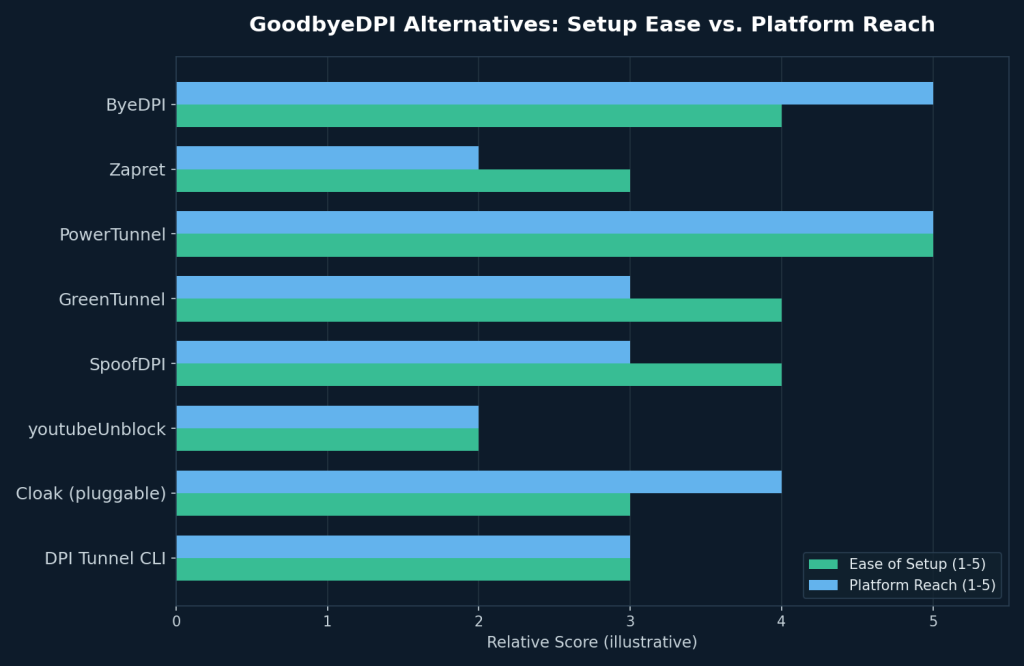
9 Secure Open-Source GoodbyeDPI Alternatives
1. ByeDPI — The Closest Cross-Platform Match
ByeDPI is usually the first stop for anyone leaving GoodbyeDPI, because it borrows the same fragmentation-based logic but ships for Windows, Linux, macOS, and Android. It runs as a local SOCKS5 proxy, so you point your browser or system network settings at 127.0.0.1 and let it handle the packet reshaping. Compared with the others, it is the broadest cross-platform option.
Why it stands out: active development, an Android build (rare among these tools), and a small enough codebase to review in an afternoon.
2. Zapret — Router-Level Bypass for a Whole Household
Zapret works via iptables/nftables rules on Linux, which means it can run on a home router (OpenWrt-compatible) and protect every device on the network without installing anything per device. Compared with proxy-based tools, Zapret is built for network-wide use at the router level.
Why it stands out: set it up once at the router, and every connected device — phones, smart TVs, laptops — benefits automatically.
3. PowerTunnel — A GUI for Non-Technical Users
Built in Java with a plugin architecture, PowerTunnel provides a graphical interface rather than a terminal. It includes a GoodbyeDPI-style plugin out of the box, so the underlying technique is nearly identical — just wrapped in buttons and toggles. It is the easiest option for users who want a visual workflow.
Why it stands out: approachable for family members or coworkers who’d never touch a command line.
4. GreenTunnel — Lightweight and Fast to Configure
GreenTunnel is a small Node.js-based local proxy focused on doing one thing: splitting TLS ClientHello packets so DPI can’t read the SNI field. It’s minimal by design, with almost no configuration required. Compared with broader tools, it is the simplest lightweight proxy option.
Why it stands out: quick to install if you already have Node.js, and easy to audit because the codebase is small.
5. SpoofDPI — Minimal Setup, SNI-Focused
SpoofDPI takes a similarly narrow approach — spoofing or fragmenting the SNI in TLS handshakes — and ships as a single binary for Windows, Linux, and macOS with almost no dependencies. It is a good fit when you want a simple binary rather than a proxy-based setup.
Why it stands out: one-command installs and a straightforward README make it a good pick for a quick test.
6. YouTubeUnblock — Linux Kernel-Level Precision
Where most tools work as a userspace proxy, YouTubeUnblock hooks in at the kernel/nftables level on Linux, giving finer control over which packets get modified. As the name suggests, it was built with video-streaming traffic patterns in mind. Compared with userspace tools, it is more specialized and lower-level.
Why it stands out: lower overhead than a proxy-based approach, since it doesn’t have to intercept and rewrite every connection at the application layer.
7. Cloak — Obfuscation as a Pluggable Transport
Cloak isn’t a direct GoodbyeDPI clone — it’s a pluggable transport that disguises VPN or Shadowsocks traffic as ordinary HTTPS. People pair it with an existing VPN when DPI is aggressive enough that packet fragmentation alone isn’t enough. Compared with the other tools here, it adds an extra layer of obfuscation rather than only reshaping packets.
Why it stands out: layering it on top of a VPN adds a second, independent obfuscation method.
8. DPI Tunnel CLI — Granular Control for Power Users
This tool exposes more low-level fragmentation and timing parameters than most alternatives, letting advanced users fine-tune settings for a specific ISP’s DPI behavior. Compared with simpler tools, it offers the most granular control.
Why it stands out: the extra configuration knobs matter if a “default settings” tool stops working on your specific network.
9. Community GoodbyeDPI Forks — Staying Native
If you’re on Windows and don’t want to leave the original tool behind, several actively maintained community forks of GoodbyeDPI add updated fragmentation strategies and bug fixes that the original repository hasn’t merged. Compared with newer alternatives, these forks keep the workflow closest to the original.
Why it stands out: minimal learning curve if you already know GoodbyeDPI’s command-line flags.
How DPI Circumvention Tools Actually Work
All of the tools above rely on a similar principle: deep packet inspection systems classify traffic by looking for recognizable patterns — a specific TLS handshake shape, a plaintext hostname, or a predictable packet size. Reshape those patterns without changing the actual content, and the DPI system can no longer match its rules.
Common techniques include:
- TLS ClientHello fragmentation — splitting the handshake across multiple packets so pattern-matching rules can’t see the full signature at once.
- TTL manipulation — sending decoy packets with a short time-to-live so they expire before reaching the DPI inspection point, while the real packet continues.
- SNI obfuscation — hiding or splitting the Server Name Indication field so a DPI system can’t read which domain you’re connecting to.
- Traffic padding — adding harmless filler data so packet sizes stop matching a known fingerprint.
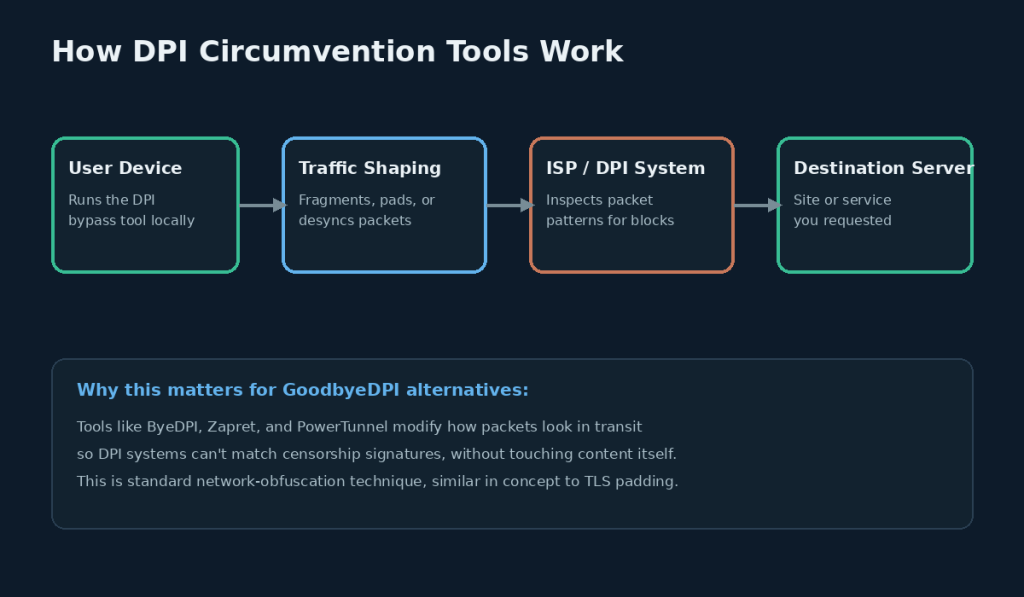
None of these techniques touch the content of your traffic — they only change its outward shape, which is why they pair well with (but don’t replace) encryption or a VPN for privacy.
Step-by-Step: Switching From GoodbyeDPI to an Alternative
- Identify your platform first. Windows users staying on Windows can often just try a community fork; anyone on Linux, macOS, Android, or a router needs one of the cross-platform tools above.
- Uninstall or disable GoodbyeDPI’s service so the two tools don’t compete for the same network interface.
- Download the alternative from its official GitHub repository — avoid third-party mirrors.
- Verify checksums or signatures if the project provides them, especially for router firmware builds.
- Configure your browser or system proxy to point at the tool’s local address (commonly 127.0.0.1 with a SOCKS5 port).
- Test against a known-blocked site to confirm the bypass is actually working.
- Check for updates regularly — DPI rules change, and an outdated tool is a silent failure.
Safety and Legal Considerations
DPI circumvention tools are widely used for legitimate purposes: preserving access to open information, protecting research and journalism, and general privacy hygiene on networks that apply aggressive traffic shaping. That said, a few practical points matter:
- Check local laws. Rules governing the circumvention of network restrictions vary significantly by country and network (a home ISP is very different from a workplace or school network).
- Stick to official repositories. Because these are open-source projects, anyone can fork them — download only from the maintainer’s verified GitHub page to avoid tampered builds.
- These tools are not a VPN replacement. They reshape packets; they don’t encrypt or anonymize traffic on their own. Pairing one with a reputable VPN or Tor adds a genuine privacy layer on top.
- Review the code or the community’s review of it before granting a tool admin/root access, since several of these run with elevated network privileges.
Frequently Asked Questions
Is GoodbyeDPI still maintained?
The original repository has periods of active development interspersed with quiet stretches, which is exactly why community forks and alternatives like ByeDPI have gained traction — they tend to patch new DPI evasion methods faster.
Which GoodbyeDPI alternative works best on Android?
ByeDPI is currently the most commonly used option with an Android build, since most alternatives in this space are desktop- or router-focused.
Can I run a GoodbyeDPI alternative on my home router?
Yes — Zapret is specifically designed to run via iptables/nftables rules on router firmware like OpenWrt, protecting every device on the network at once.
Do these tools slow down my internet connection?
Most add negligible latency, since they reshape only a handful of initial packets per connection rather than proxying all traffic through a remote server, though lightweight proxy-based tools (such as GreenTunnel or PowerTunnel) incur a small amount of local overhead.
Are GoodbyeDPI alternatives safe to use?
Because all the tools covered here are open-source, their code can be publicly reviewed. Sticking to actively maintained projects and downloading only from official repositories is the main safety practice to follow.
Do I still need a VPN if I’m using one of these tools?
Yes, if privacy or encryption is your goal. DPI bypass tools reshape packet patterns to avoid blocking; they don’t encrypt your traffic’s content the way a VPN does.
What’s the difference between GoodbyeDPI and Zapret?
GoodbyeDPI is a Windows-only executable, while Zapret applies similar fragmentation logic through Linux’s iptables/nftables, making it a better fit for routers and Linux servers.
Conclusion
GoodbyeDPI proved the concept: small changes to how packets look in transit can be enough to slip past deep packet inspection. Its open-source alternatives — ByeDPI, Zapret, PowerTunnel, GreenTunnel, SpoofDPI, YouTubeUnblock, Cloak, DPI Tunnel CLI, and the active community forks — extend that idea across the platforms GoodbyeDPI never covered, from Android phones to home routers.
Start with the tool that matches your platform and comfort level from the comparison table above, verify you’re downloading from the official repository, and keep it updated as DPI systems evolve.
